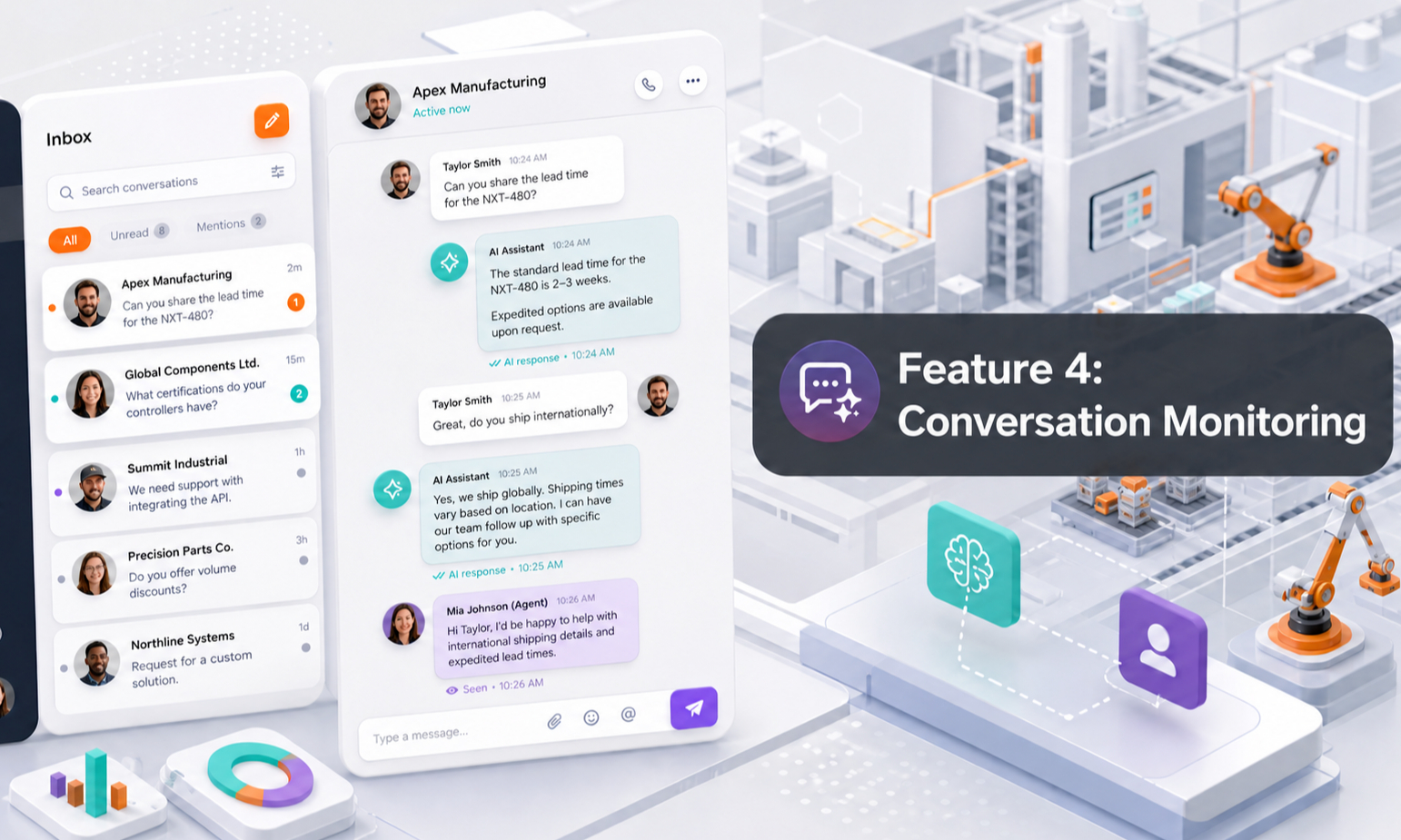
Conversation Monitoring gives your team visibility into every customer interaction handled by your AI Agent.
Each conversation is recorded in the Conversation portal, so you can review what customers asked, how the Agent responded, what products they showed interest in, and whether follow-up is needed.
When a new customer starts a conversation, your team can also receive an email notification so important enquiries are less likely to be missed.
This feature becomes even more useful when combined with Lead Capture. Conversation Monitoring shows what the customer is thinking and asking, while Lead Capture helps organise the customer details needed for follow-up.
1. Why Conversation Monitoring Matters
Objective Give your team visibility into what customers are asking and what opportunities may be developing through your AI Agent.
Conversation Monitoring helps you understand:
- What customers are interested in
- Which products they are asking about
- What problems they are trying to solve
- Which technical questions come up frequently
- Which enquiries show buying intent
- Which conversations require human follow-up
- Where the AI Agent may need better knowledge
Instead of treating your AI Agent as a black box, your team can see what is happening behind every customer conversation.
2. Every Conversation Is Recorded
Every customer conversation handled by the AI Agent is recorded in the Conversation portal.
You can open a conversation and review the full thread.
This helps you understand:
- Customer requirements
- Product interest
- Questions asked
- Technical concerns
- Commercial intent
- Follow-up opportunities
The full conversation gives your team more context than a simple enquiry form.
For example, instead of only seeing:
Customer is interested in Product X.
you may be able to see that the customer asked about Product X, compared it with another model, requested delivery next month, and asked for pricing.
That context makes follow-up more useful.
3. New Conversation Notifications
Objective Keep your team aware when new customers start talking to your AI Agent.
When a new customer starts a conversation, your team can receive an email notification.
This allows your team to:
- Know that a new enquiry has arrived
- Review the conversation
- Identify high-intent customers
- Follow up when appropriate
- Avoid missing important opportunities
The AI Agent can continue handling the conversation while your team stays informed in the background.
4. Understand Customer Intent
Conversation history can help you understand what the customer is actually trying to achieve.
Customers may ask about:
- A specific product
- Product comparison
- Technical specifications
- Compatibility
- Pricing
- Availability
- Delivery
- Rental period
- Quantity
- Application
- Installation
- Technical support
The conversation often reveals more than the customer's contact details alone.
For example, a customer who asks:
“Which model is suitable for this application?”
“Do you have it available next month?”
“Can you quote five units?”
is giving your team useful information about their requirement and likely buying intent.
5. Conversation Monitoring and Lead Capture
Objective Connect customer conversations with structured lead information.
Conversation Monitoring and Lead Capture are designed to work together.
A simple way to understand the difference is:
Conversation Monitoring shows what the customer said.
Lead Capture records the customer information your team needs for follow-up.
Lead information may include:
- Customer name
- Company
- Phone number
- Product interest
- Requirement
- Quantity
- Location
- Timeline
When both are available, your sales team can review the customer's details together with the full conversation.
This gives your team much better context before making contact.
6. Use Conversations for Sales Follow-Up
A customer who spends time asking detailed questions may already be showing meaningful interest.
Conversation Monitoring allows your team to review these discussions before following up.
Instead of starting with:
“How can I help you?”
your salesperson can continue from where the AI Agent stopped.
For example:
“I saw that you were comparing Model A and Model B for your application and were looking for five units next month. Let me help you confirm availability and pricing.”
This creates a more relevant and natural follow-up experience.
7. Use Conversations to Improve Your AI Agent
Conversation Monitoring is also one of the best places to identify where your AI Agent can improve.
Look for situations where the Agent:
- Could not answer a question
- Gave an unclear answer
- Asked an unnecessary follow-up question
- Missed relevant product information
- Used outdated information
- Handed over too early
- Failed to capture useful customer information
Then improve the correct part of your setup.
For example:
Missing product information
→ Update Product Knowledge
Incorrect answer to a common question
→ Update FAQ
Weak enquiry handling
→ Improve SOP
Incorrect response boundary
→ Update AI Rules
Outdated commercial information
→ Update Terms & Conditions
The customer conversation itself should not automatically become approved knowledge. Review the issue first, then update the correct knowledge source.
8. Search and Review Conversations
Objective Make it easier to find and inspect customer conversations as the number of chats grows.
From the Conversation portal, you can search and review previous conversations.
You may also use the available filters or status indicators to identify conversations that require attention.
Open any conversation to review the complete thread and understand what happened.
This becomes increasingly useful as your AI Agent handles more customer enquiries.
9. What Should Your Team Look For?
You do not need to manually analyse every conversation in the same level of detail.
Prioritise conversations that show:
- Strong product interest
- Request for quotation
- Pricing enquiries
- Availability enquiries
- Detailed technical requirements
- Human handover
- Questions the Agent could not answer
- Customer dissatisfaction
- High-value product opportunities
- Repeated questions across multiple customers
These conversations often provide the highest value for both sales follow-up and AI Agent improvement.
10. Build a Continuous Improvement Loop
Conversation Monitoring should not only be used to check what happened.
Use it to continuously improve your AI Agent.
A simple process is:
- Review important conversations
- Identify missing or weak answers
- Find the cause
- Update the relevant knowledge, SOP or AI Rule
- Test the Agent again
- Continue monitoring new conversations
Over time, real customer conversations will show you what information matters most to your customers.
This helps you improve both your AI Agent and your overall customer experience.
11. Key Takeaway
Conversation Monitoring turns every AI Agent conversation into useful business visibility.
It helps your team understand:
- What customers are asking
- What products they are interested in
- What problems they are trying to solve
- Which enquiries may require follow-up
- Where the AI Agent can improve
When combined with Lead Capture, your team gets both the customer's information and the context behind the enquiry.
Your AI Agent can handle the conversation, while your team stays informed and steps in when it matters.